.avif)

Interview Report
Structured Candidate Reports for Faster Hiring Review
Turn interview results into structured reports with candidate summaries, configured scores, transcripts, recordings, and side-by-side comparison, so hiring teams can review evidence and align on next steps.
Turn Completed Interviews Into Structured Candidate Evaluation Reports
KitaHQ works as a candidate evaluation report generator by turning completed interviews into clear summaries, assessment scores and supporting evidence for recruiter and hiring-manager review.

Review Candidates Faster
Start with a concise summary and overall assessment score instead of watching every interview from beginning to end.

Review Consistently
See each candidate against the questions and assessment criteria configured for the same role.

Full Interview Context
Open the transcript, recording and question-level responses whenever your team needs more evidence.

Structured reports. Human decisions.
KitaHQ provides the evidence, your hiring team makes the final call.
Candidate Summary
Understand Each Candidate at a Glance
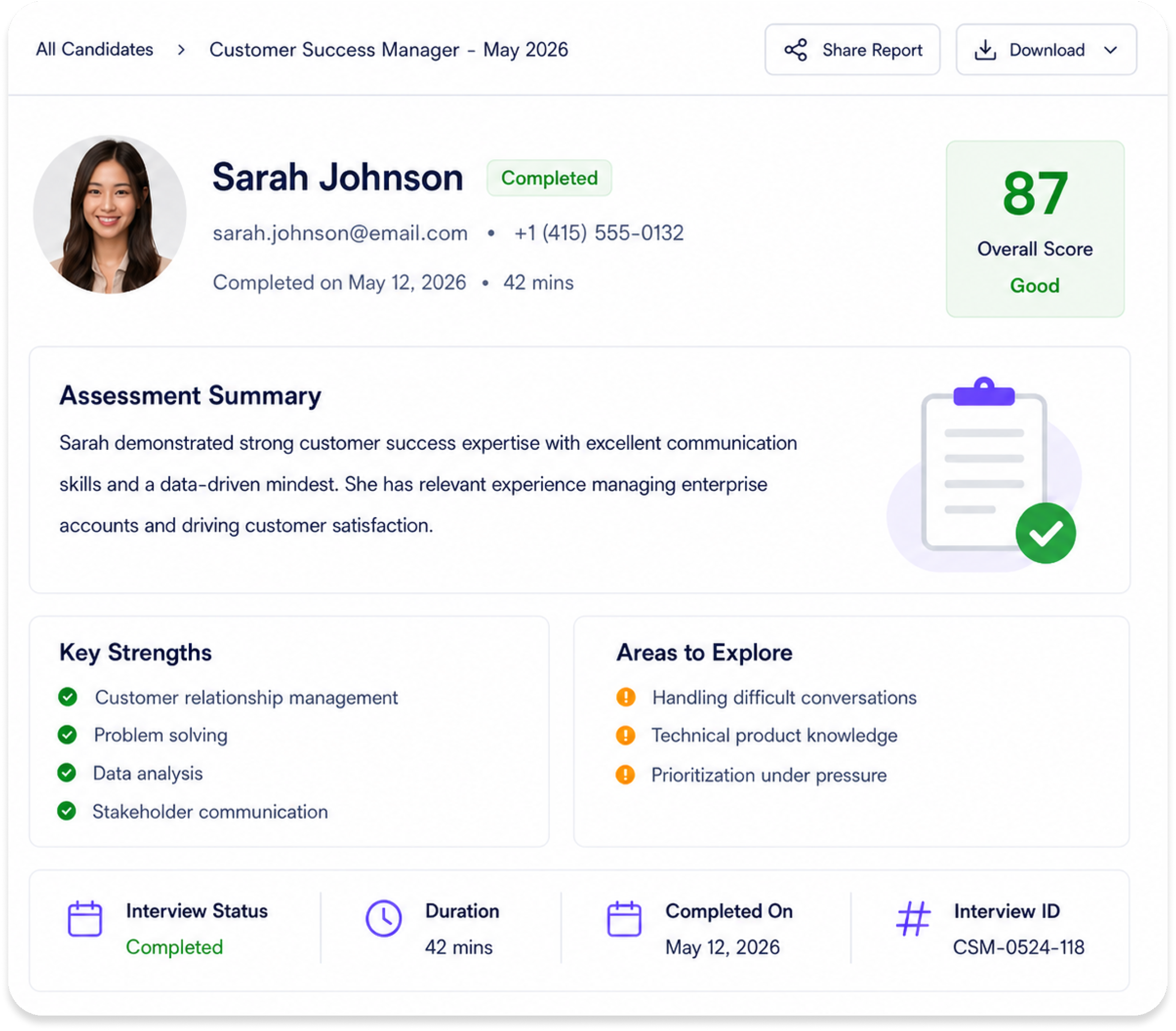
Start with a concise summary that brings the most important screening information into one view, so your team can prioritise who to review first.

Overall Assessment Score
See the candidate's overall assessment result based on the criteria used for this interview.

Candidate Assessment Summary
Review a written summary of the candidate's experience, responses and overall screening outcome.

Strengths and Areas to Explore
Identify where the candidate demonstrated strong evidence and which areas may require further validation.

Interview Status and Details
See whether the interview was completed, when it was submitted and how long the candidate took to complete it.

The summary helps recruiters prioritise their review.
It does not replace the underlying interview evidence or the hiring team's judgement.
Assessment Evidence
Review the Evidence Behind Every Score
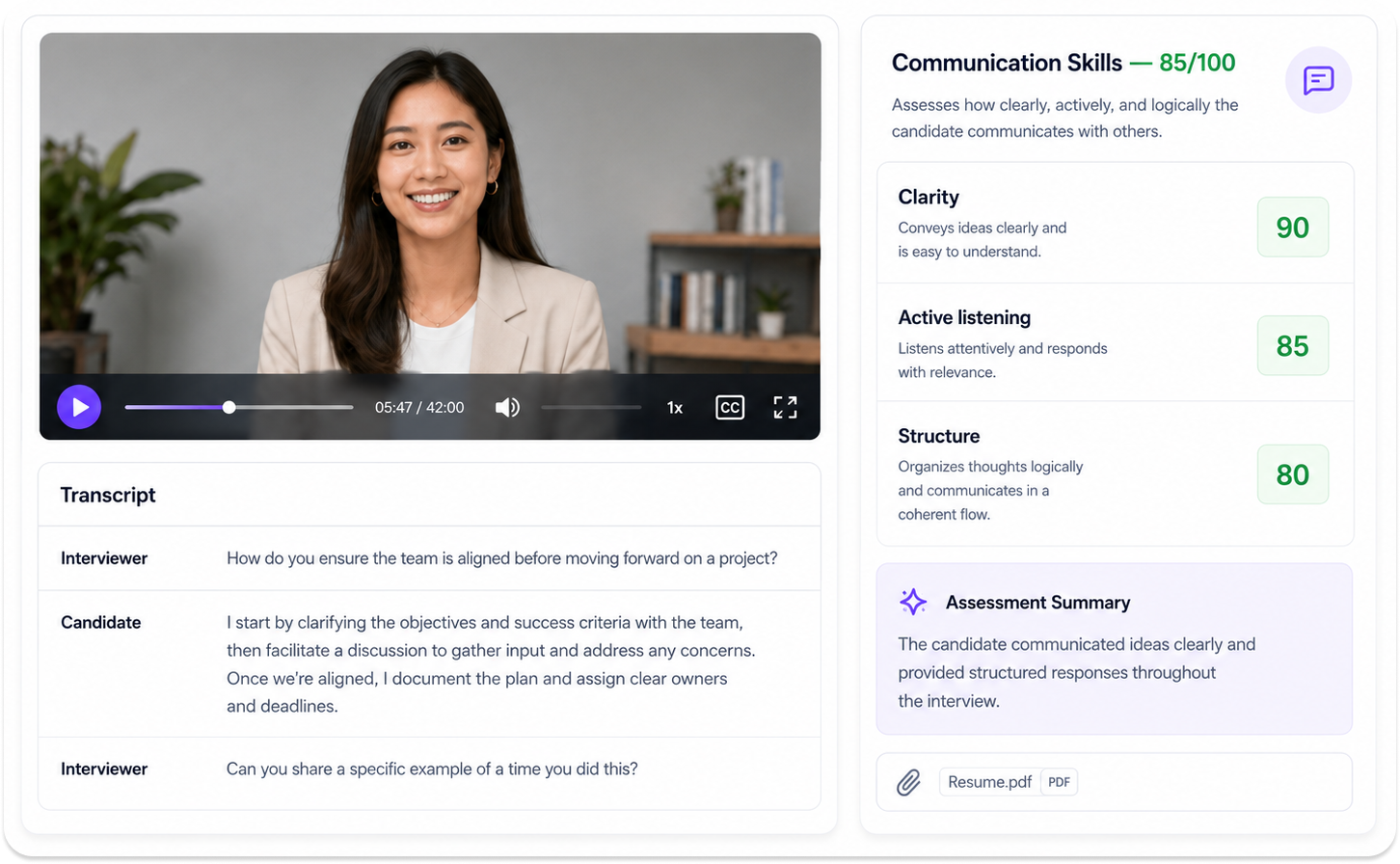
Go beyond the summary and explore the full interview evidence: scores, responses, transcripts, and recordings, whenever you need deeper context.

Criteria-by-Criteria Assessment
See how the candidate performed against each competency or skill with a clear score and explanation.

Question-Level Responses
Review every interview question with the candidate's response and the corresponding assessment.

Interview Transcript
Read the full conversation in text form to quickly scan key points and take notes.

Interview Recording and Replay
Replay the candidate's responses to evaluate tone, communication style and overall delivery.

Candidate Documents
View resumes and other submitted documents alongside the interview results.

Share or Download the Report
Share the report with hiring managers or download a copy for offline review.

Clear reports. Full context. Better decisions.
Everything your team needs to make informed hiring decisions—backed by evidence.
Candidate Pool Review & Comparison
Find and Compare Strong Candidates
Across a Large Interview Pool
Use KitaHQ's AI hiring tools to review candidate performance in structured interviews, search, filter and compare results, so your team focuses on the candidates that matter most.

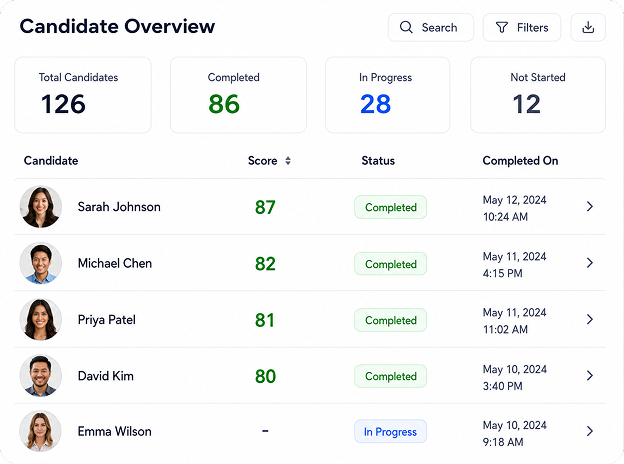
Search Candidates by Name
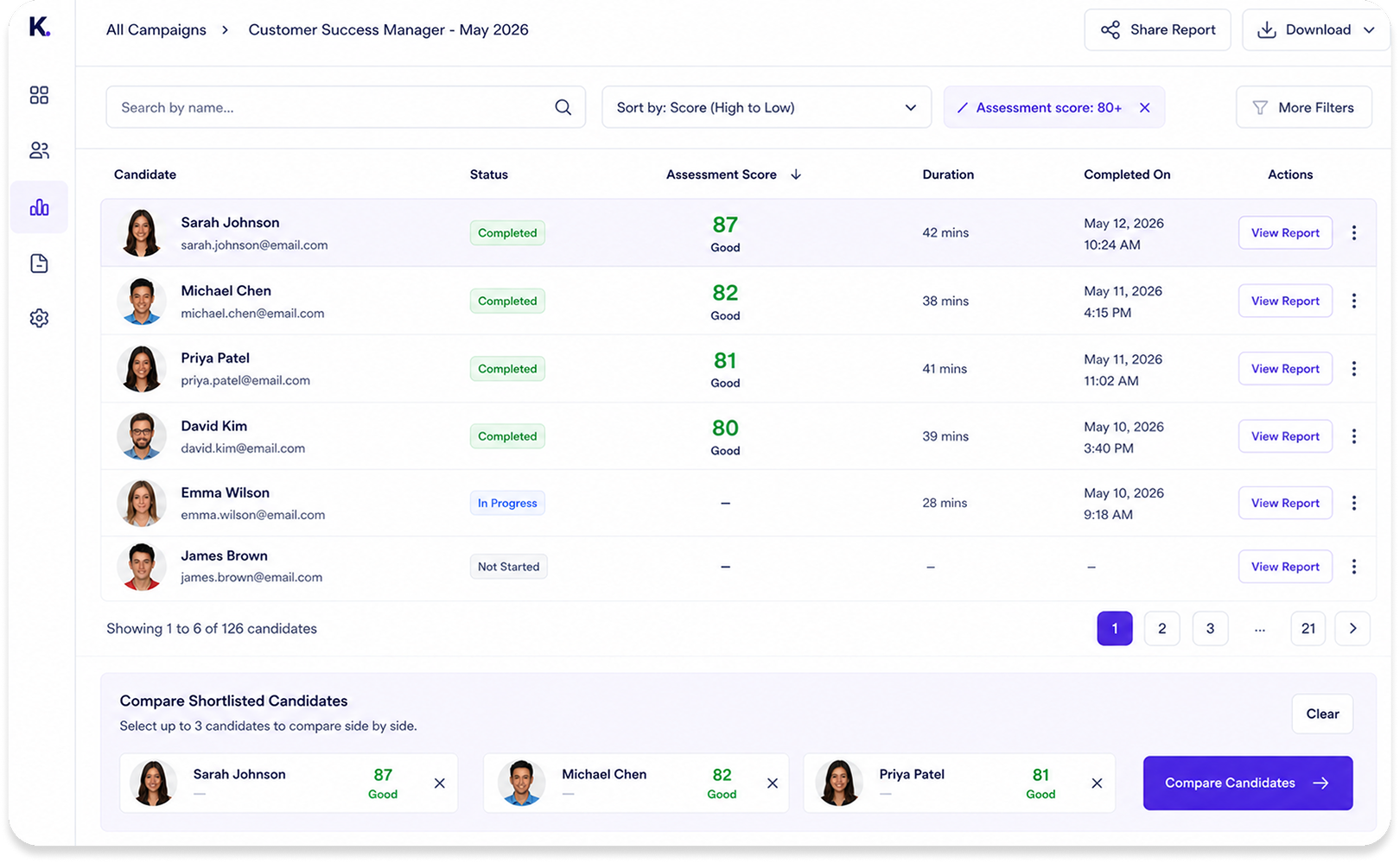
Find a specific candidate quickly when reviewing a large hiring campaign.

Sort by Assessment Score
Bring higher scoring candidates to the top for faster initial review.

Filter by Score Threshold
Focus on candidates who meet a selected assessment threshold, such as 80 or above.

Review Completion Status
See which candidates have completed the interview, which are in progress and which are pending.

Compare Candidate Results
Review assessment scores, summaries and key findings side by side using the same evaluation structure.

Open the Supporting Evidence
Move from the list into the full report, transcript or recording whenever a closer review is needed.

Search, sorting and filters help teams prioritise candidates. Recruiters and hiring managers still decide who moves forward.
Manage & Export Interview Results
Keep Candidate Results Organised Beyond the Dashboard
Use candidate contact details and exported interview data to support follow-up, internal reporting and wider recruitment workflows.

Reach Candidates More Easily
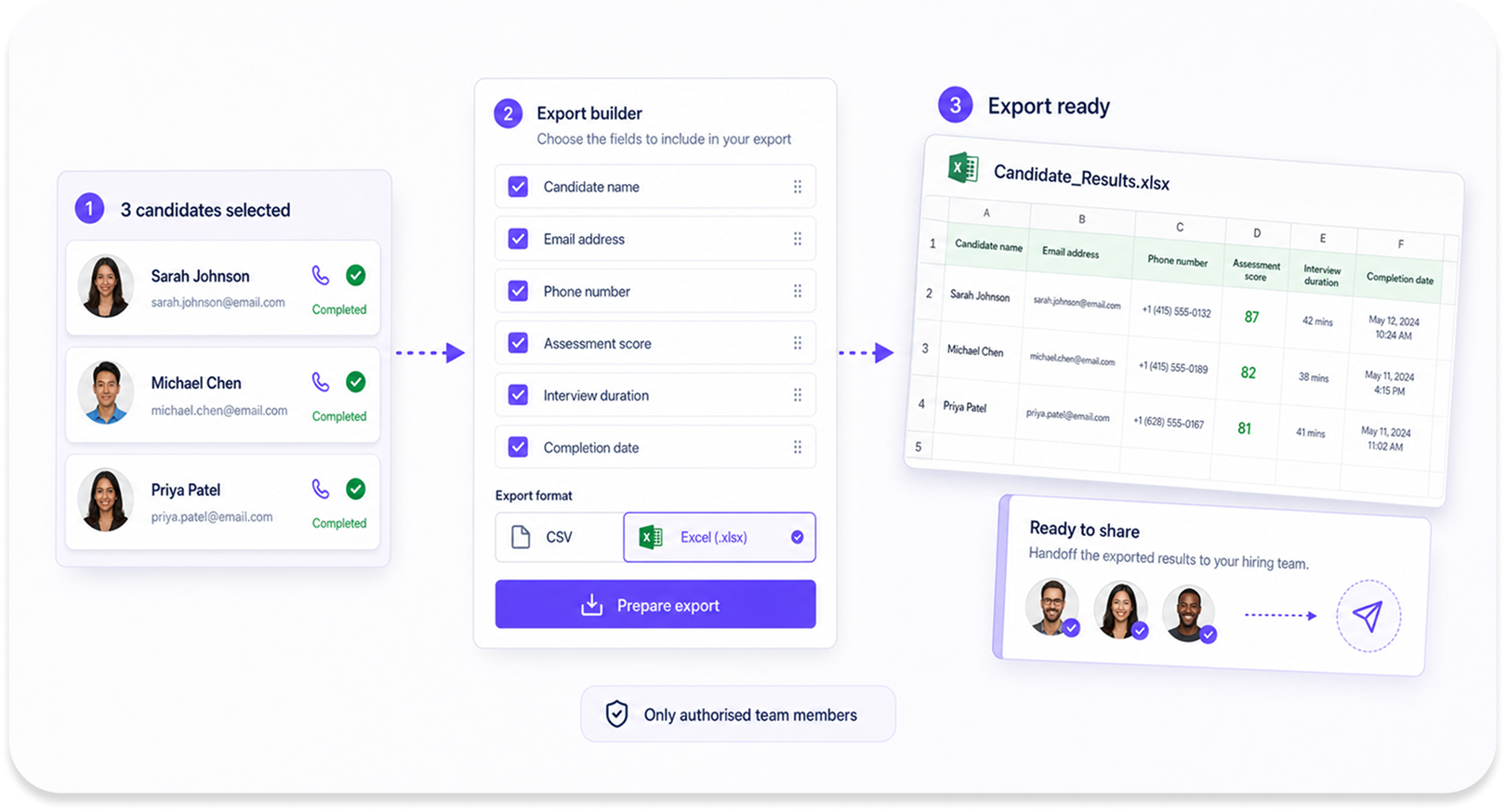
View candidate email addresses and phone numbers alongside their interview status and results, making it easier for recruiters to follow up.

Export Interview Results
Download candidate interview data in CSV or Excel format for offline review, reporting or use in other systems.
Exports can include:

Candidate name
Email address
Phone number
Interview status
Interview duration
Completion date
Assessment score
Connected Product Workflow
From Interview Setup to Candidate Review
KitaHQ’s interview products work together so you can run structured interviews, assess candidates consistently and review results with complete clarity.

AI Video Interview
Run structured first-round interviews without scheduling and collect candidate responses at scale.
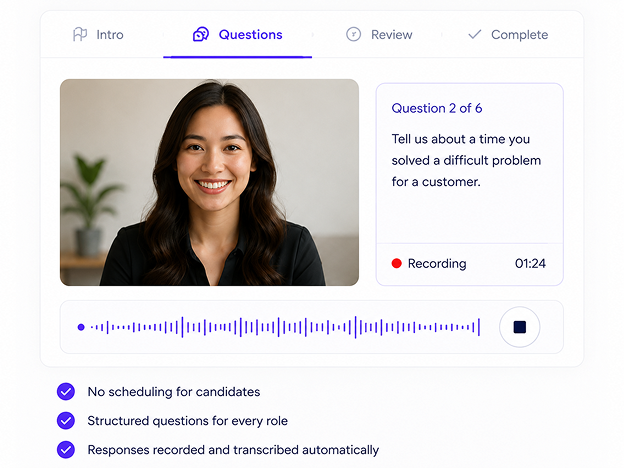
Explore AI Video Interview

.svg)
AI Interview Assessment
Assess candidate responses against your defined skills and competencies using standard or custom criteria.
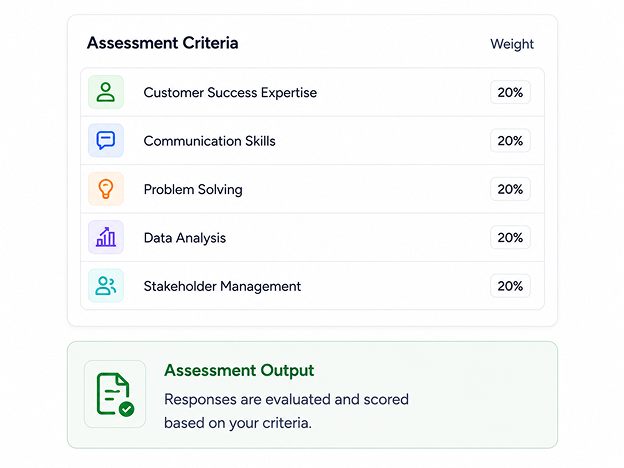
Explore AI Interview Assessment

.svg)
Candidate Report
Review structured reports, compare candidates and export results to make confident decisions faster.
You are here


Proof
Clearer Candidate Review for
Faster Hiring Decisions
Recruiters and hiring managers trust KitaHQ to turn completed interviews into clear reports, consistent scores and confident decisions.








Still have questions?
Let our FAQ guide you with the answers.
What is a candidate evaluation report generator?
A candidate evaluation report generator turns completed interviews into structured reports for human review. KitaHQ reports can include an assessment summary, criteria-level scores, transcripts, recordings and question-level responses.
What is included in a KitaHQ interview report?
Each completed interview can include a candidate summary, overall assessment score, criteria-level assessment, strengths, areas to explore, transcript, recording and question-level responses.
Can we customise the assessment criteria?
Yes. Teams can use consistent criteria across candidates and configure role-specific questions and competencies through KitaHQ’s AI Interview Assessment.
Can recruiters compare candidates?
Yes. Recruiters can review candidates from a shared list, sort and filter candidates based on assessment scores and open detailed reports for closer comparison.
Can we search for a specific candidate?
Yes. Recruiters can search candidates by name when reviewing a large interview campaign.
Can we filter candidates by assessment score?
Yes. Recruiters can sort candidates by assessment score and filter the list using a selected threshold, such as candidates scoring 80 or above.
Can we export candidate interview results?
Yes. Candidate interview information can be downloaded in CSV or Excel format for reporting, offline analysis or use in other recruitment workflows.
Can recruiters see candidate contact details?
Yes. Recruiters can view candidate email addresses and phone numbers alongside their interview information where those details have been collected.
Does KitaHQ analyse candidate performance?
KitaHQ analyses candidate performance during structured interviews against configured assessment criteria. It does not predict post-hire productivity or employee performance.
Does KitaHQ make the final hiring decision?
No. KitaHQ provides structured reports, assessment scores and candidate comparison tools. Recruiters and hiring managers decide who moves forward and who gets hired.
Is this recruitment analytics or post-hire performance software?
No. KitaHQ Candidate Analytics focuses on candidate-level reports and comparison after early-stage screening. It is not a post-hire performance, productivity-tracking or employee analytics system.
Get manager-ready candidate analytics for your next hiring surge
Discover how KitaHQ’s AI resume screening tool can help your team identify top talent faster, fairer and at scale
GET STARTED WITH A DEMO